Voice Log
Log Your Site Hands-Free
Your hands are on tools, not a phone. Speak your daily log out loud and DailySite transcribes and saves it instantly. No typing required.
What you can do with voice log.
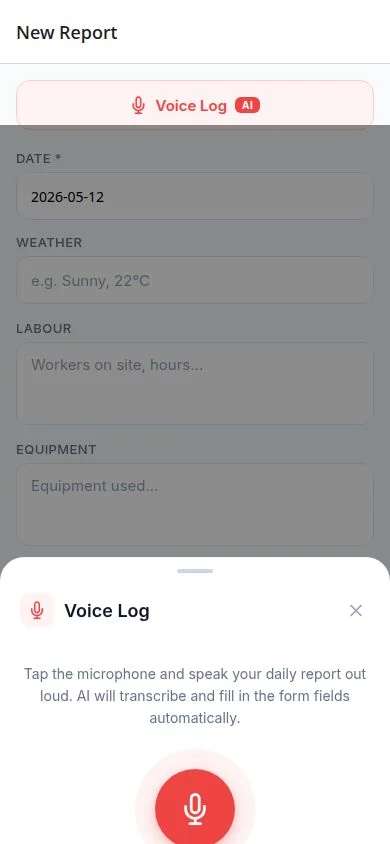
DailySite Voice Log transcribes spoken site notes into report fields. Describe the work, crew, equipment, and issues, then check the information before saving the daily report.
Everything you need
Built for how contractors actually work — fast, mobile, and in the field.
Speak-to-Log
Hold the mic button, say what happened, release. Your words are transcribed and saved to the daily log immediately.
Works in Noisy Environments
Built for the job site — optimized for transcription accuracy even with background noise from equipment and crews.
Log It the Moment It Happens
Don't trust your memory at 6pm. Voice log issues, delays, and observations the second they occur on site.
AI Cleans It Up
Voice logs flow into your AI report assistant. Your rough spoken notes become polished documentation automatically.
Timestamped Records
Every voice log is time-stamped. When a dispute comes up months later, you have exact records of what happened and when.
Attached to the Right Report
Voice logs are automatically linked to the current day's report for the active project. No manual filing needed.
20 Transcriptions/Month on Starter
Starter plan includes 20 voice transcriptions/month. Upgrade to Pro for unlimited voice logging.
Review Any Time
Play back or read your voice logs anytime. Your spoken notes become searchable text records.
How it works
Simple enough to use from your truck before the crew shows up.
Open the Voice Log in DailySite
Tap the microphone button on your active project's daily report page.
Speak what happened
Describe the site conditions, crew activity, issues, or anything else worth logging. Talk naturally.
Your log is transcribed instantly
DailySite converts your speech to text and saves it to your daily report automatically.
Use it in your report
Your voice logs feed directly into your daily report. Use AI to turn them into a polished summary.
A few things worth knowing.
What should I say in a voice log?
Describe where work happened, what the crew completed, equipment used, and any delays or deliveries. Short, specific sentences are easier to review than a long recap.
Can I review the report after speaking?
Yes. Check the transcribed information and report fields before saving, especially names, measurements, and quantities. Voice logging helps with typing; it doesn't replace your review.
Ready to get to work?
Free 14-day trial. No credit card required.