Estimates
Win More Jobs with Professional Estimates
Send a polished, detailed estimate before you even leave the client's driveway. No laptop, no office, no delay — just you, your phone, and a winning proposal.
What you can do with estimates.
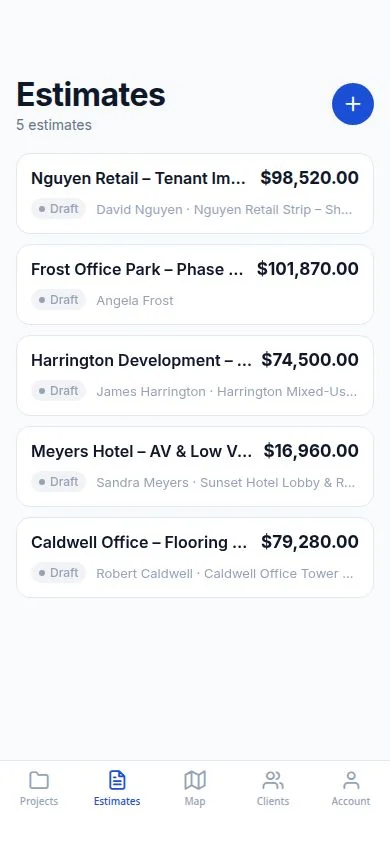
DailySite lets contractors prepare estimates with client details and line items from their phone. Keep estimates with the relevant client or project and export a PDF to share the proposed scope and price.
Everything you need
Built for how contractors actually work — fast, mobile, and in the field.
Professional Estimate Templates
Start from a clean, professional template with your company name, logo, and contact info already filled in.
Line-Item Breakdown
Add materials, labour, and other costs as individual line items. Clients see exactly what they're paying for.
Send While You're Still On Site
Create and send an estimate in minutes while the job is fresh in your mind. Strike while the iron is hot.
Automatic Totals
Add line items and DailySite calculates subtotals, taxes, and totals automatically. No spreadsheets needed.
Email or Share Instantly
Send your estimate directly from the app via email or share as a PDF. Clients get it while you're driving home.
Convert to Invoice in One Tap
Once the job is approved, convert your estimate to an invoice instantly. No re-entering data.
Scope of Work Included
Add a detailed scope of work to your estimate so there are no surprises — and no disputes — when the job is done.
Unlimited Estimates
Create unlimited estimates on every plan. No caps, no per-estimate fees.
How it works
Simple enough to use from your truck before the crew shows up.
Tap New Estimate
Open DailySite, select your project, and tap New Estimate. Your company info is pre-filled.
Add your line items
Enter materials, labour, and any other costs. Add descriptions so the client knows exactly what's included.
Review and finalize
Check the totals, add any notes or scope of work details, and review the final estimate.
Send it
Email the estimate directly or share as a PDF. Convert to an invoice when the job is won.
A few things worth knowing.
What should a construction estimate include?
Set out the scope, quantities, labor and material line items, taxes, and any exclusions. Make assumptions clear so the customer understands what the price covers.
Can I share an estimate as a PDF?
DailySite supports PDF estimates so you can send a clear, professional document to your client from your phone.
Ready to get to work?
Free 14-day trial. No credit card required.