By DailySite · Boson Technologies Inc. · Written
Organize construction photos by project first, then by the day and work area. Take a wide shot for context, add close-ups for details, and explain the important images in the daily report. The goal is to find a useful record later, without having to remember what the photo meant.
1. Put the photo in the right job.
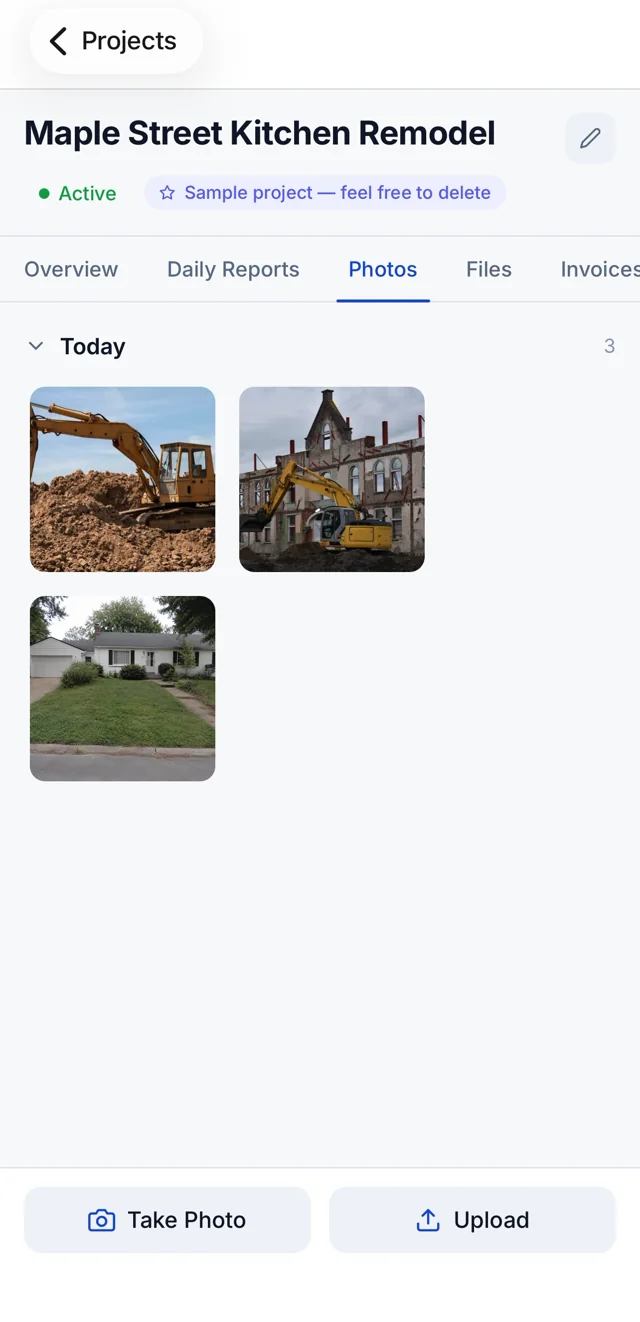
Open the project before capturing or uploading images. When several jobs are running, a camera roll alone makes it easy to mix an inspection photo from one site with a delivery photo from another. In DailySite, the project's Photos tab keeps the images under that project.
2. Capture the context before the detail.
For each item worth documenting, take a wider image that identifies the room, elevation, or work area. Follow it with the close-up. A close-up of a crack, bracket, or fitting can be difficult to place once the work is covered or the crew has moved on.
3. Record the stage of work.
Choose useful milestones: existing conditions, work in progress, concealed work before covering, and the finished result. When practical, take progress photos from a similar position so someone reviewing them can compare the same area.
4. Connect the images to the daily report.
Write down what changed and where. In the report's work notes, use locations and quantities: “East kitchen wall: completed framing around the new window opening.” Attach relevant images to the report. Use the photo record to support the notes rather than expecting a picture to explain every decision.
A worked example: one wall, three useful records.
This example is fictional. The references are a naming convention you can use in your own records, not automatic labels promised by the app.
| Record | Photo | Daily report note |
|---|---|---|
| Kitchen / east wall / before | Wide view before opening the wall | Documented existing wall finish and window location before demolition. |
| Kitchen / east wall / rough-in | Wide view plus close-up before covering | Recorded framing and service routes before board installation. |
| Kitchen / east wall / finish | Same wide viewpoint after finishing | Finished board and trim at the new window opening; touch-up work noted separately. |
5. Review the record before leaving the site.
Check that the right images are saved in the right project. Remove accidental duplicates and images that do not add context. Record delays, decisions, or follow-up work in the report while the details are fresh. Follow the project's rules when photographing people, neighboring properties, or sensitive information.
A short end-of-day checklist.
- Correct project and work area identified.
- Wide views and useful details captured.
- Concealed work recorded before covering.
- Important photos connected to the day's report.
- Notes reviewed for locations, quantities, and follow-up actions.
See DailySite photo documentation and the daily report guide for the rest of the reporting workflow.